
Claude Skills - CRM Maintenance, Day 5

Why Your CRM Is Out of Date (And How AI Fixes It Automatically)
Published: 3 June 2026
Author: Ray Baptiste | Ai Onion
Series: Claude AI Skills for Small Business Owners — Day 5 of 31
Read time: 5 minutes
The £14,000 Wake-Up Call
Marcus runs a commercial cleaning company with eight staff, a steady flow of new enquiries, and a reputation built on reliability. By most measures, a healthy small business.
He also had HubSpot. His accountant had recommended it eighteen months earlier: "You need a CRM, Marcus. You're losing track of your leads."
So Marcus set it up. Paid for the subscription. Spent a Sunday afternoon importing contacts. And then, like most small business owners with a CRM, slowly stopped using it.
Not out of laziness. Out of reality. When you're managing a team, quoting jobs, dealing with client queries, and trying to actually run a business, logging notes into a CRM is the first thing that falls off the list.
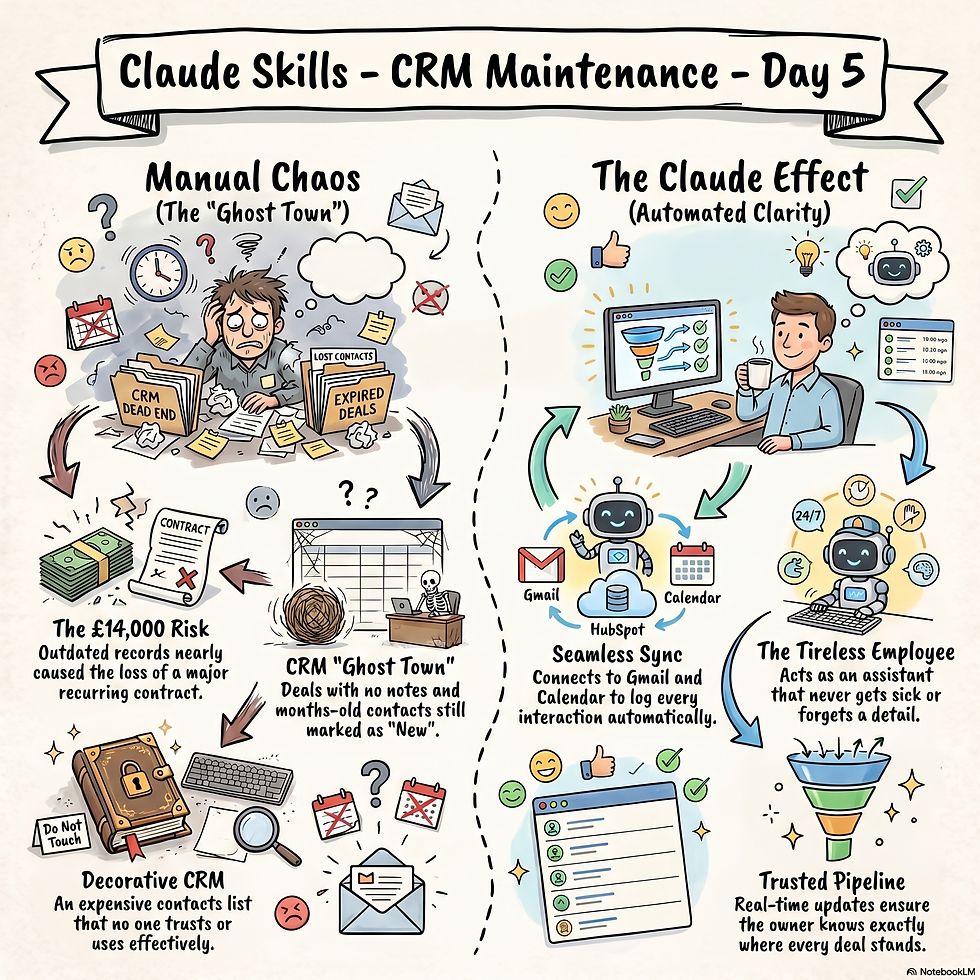
By month six, the HubSpot pipeline was a graveyard. Deals with no notes. Contacts from three months ago still marked as "New." Conversations that had happened over email, over the phone, over a coffee , none of it recorded.
Then came the moment that changed everything.
A prospect called back. Someone Marcus had spoken to twice before, a facilities manager at a mid-sized office block, worth roughly £14,000 a year in recurring revenue. Marcus opened HubSpot. Nothing. No notes. No record of what they'd discussed, what objections had come up, what he'd promised to follow up on.
He had to wing it. He nearly lost the deal.
That was the wake-up call.
Why Small Business CRMs Fail (It's Not What You Think)
The common assumption is that CRM failure is a discipline problem, business owners just aren't committed enough to keep it updated.
That's wrong.
The real problem is that CRM maintenance is manual data entry in disguise. Every time you have a call, you're expected to open HubSpot, find the contact, write up what was said, update the deal stage, and set a follow-up task. Then do the same after every email. Every meeting. Every conversation.
For a business owner already wearing six hats, this simply doesn't happen consistently. And an inconsistently updated CRM is worse than useless, it gives you false confidence that you know where things stand, when you don't.
The solution isn't more discipline. It's removing the manual step entirely.
What Is Claude AI's CRM Maintenance Skill?
Claude AI , Anthropic's AI assistant, includes a suite of skills built specifically for small business owners. One of them is CRM Maintenance.
Here's what it does in plain English:
It keeps your HubSpot updated automatically, based on what's already happening in your email and calendar.
You connect two things: your Gmail account, and your Google Calendar. That's the setup. Twenty minutes, one afternoon.
After that, Claude monitors your business communications in the background. When you send or receive an email from a contact in your CRM, Claude logs it as a note against that deal. When a meeting takes place, it gets recorded. When a conversation signals a change in where a deal stands, a client confirms they want to proceed, a prospect asks for a quote, Claude updates the deal stage accordingly.
It also flags stale records. If a deal hasn't had any activity in a while, Claude surfaces it so nothing falls through the cracks.
You don't open HubSpot to do data entry. Claude does it as your business happens.
How We Set It Up for Marcus
After that near-miss with the £14,000 lead, Marcus was ready to do something different.
We connected his Gmail and Google Calendar to Claude — a straightforward process that took about twenty minutes. We then checked his HubSpot deal stages to make sure they reflected how CleanPro actually sells (they did, roughly), and switched on the CRM Maintenance skill.
No training required. No new workflows. No asking Marcus or his team to change their habits.
Within the first week, Claude had automatically logged fourteen email exchanges against active deals, updated three deal stages based on conversations that had already happened, and flagged two contacts who hadn't heard from Marcus in over six weeks.
Marcus hadn't opened HubSpot to type a single thing.
The Result Three Weeks In
Three weeks after setup, Marcus sent me a screenshot of his HubSpot pipeline.
It was current. Every deal had notes. Every recent conversation was captured. The contacts he'd been meaning to follow up with were flagged, not forgotten.
His exact words: "I actually trust my CRM now."
That phrase matters more than it might seem. A CRM you don't trust is just an expensive contacts list. You ignore it when it matters most, like when a high-value prospect calls back and you need context fast.
A CRM you trust becomes a genuine sales tool. It tells you who to call. It reminds you what you promised. It shows you where your pipeline is healthy and where it's leaking.
That's what Marcus has now. And the next time a prospects calls back looking to spend £14,000 a year? He's ready.
Frequently Asked Questions
Does this work with CRMs other than HubSpot?The CRM Maintenance skill is currently optimised for HubSpot, which is the most widely used CRM among small businesses in the UK. Support for other platforms is growing.
Do I need to change how I write emails?No. Claude reads your existing emails as they are. You don't need to write anything differently or use any special format.
Is my email data safe?Claude processes your emails to extract business context, contact names, deal references, conversation outcomes — but does not store the content of your emails beyond what's needed to update your CRM. Your data remains in your own connected accounts.
What if Claude updates a deal stage incorrectly?You can review and override any changes Claude makes in HubSpot directly. The skill is designed to reduce admin, not replace your judgement. In practice, misclassifications are rare, and easy to correct when they happen.
How long does setup take?For most small businesses, around twenty minutes to connect Gmail and Calendar, and another ten to review your HubSpot deal stages. No ongoing maintenance required.
Can Claude log phone calls too?Currently the skill captures email and calendar activity. Phone call logging requires a call integration, this is on the roadmap for future capability.
Is This Right for Your Business?
The CRM Maintenance skill works best for businesses that:
Already have (or are planning to get) HubSpot
Do most of their client communication over email
Have an active sales pipeline with five or more live deals
Are losing track of leads due to lack of time to update records manually
It's particularly well-suited to service businesses , trades, consultancies, agencies, cleaning companies, property managers, accountants, where deals involve multiple conversations over days or weeks before a decision is made.
If you're a product business selling one-off transactions with no follow-up cycle, this skill will be less relevant. But if relationship and follow-up are central to how you win work, a CRM you can trust is one of the highest-leverage tools you can have.
What's Next in the Series
Tomorrow I'm covering the Content Strategy skill, how Claude analyses your actual sales data to tell you what you should be posting about this month. No guessing. No generic advice. Just a content brief built from what's already working in your business.
If you'd like to be notified when that goes live, follow Ai Onion on LinkedIn, Facebook, or Instagram.
And if your CRM situation looks anything like Marcus's did , or if you don't have a CRM at all and you're wondering where to start, get in touch. I'll help you work out the right setup for your business.
Ray Baptiste is the founder of Ai Onion, an AI training and implementation consultancy helping small business owners use AI tools practically and profitably. This post is part of a 24-day series covering Claude AI's small business skills.


Comments